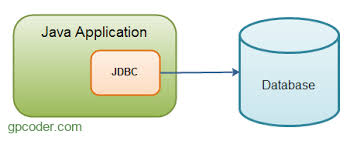
Kết nối Java với MySQL là kỹ năng cơ bản trong phát triển ứng dụng backend. Bài viết này sẽ hướng dẫn bạn từng bước.
Chuẩn Bị
1. Cài Đặt MySQL
Tải và cài đặt MySQL từ mysql.com, hoặc sử dụng Docker:
1
| docker run --name mysql-container -e MYSQL_ROOT_PASSWORD=password -d -p 3306:3306 mysql:latest
|
2. Thêm MySQL Connector
Thêm dependency vào pom.xml (Maven) hoặc build.gradle (Gradle):
Maven:
1
2
3
4
5
| <dependency>
<groupId>com.mysql</groupId>
<artifactId>mysql-connector-j</artifactId>
<version>8.0.33</version>
</dependency>
|
Gradle:
1
| implementation 'com.mysql:mysql-connector-j:8.0.33'
|
Hoặc tải JAR từ Maven Repository.
Kết Nối Cơ Bản
 1
 2
 3
 4
 5
 6
 7
 8
 9
10
11
12
13
14
15
16
17
18
19
20
21
22
23
| import java.sql.Connection;
import java.sql.DriverManager;
import java.sql.SQLException;
public class MySQLConnection {
private static final String URL = "jdbc:mysql://localhost:3306/mydatabase";
private static final String USERNAME = "root";
private static final String PASSWORD = "password";
public static Connection getConnection() throws SQLException {
return DriverManager.getConnection(URL, USERNAME, PASSWORD);
}
public static void main(String[] args) {
try (Connection conn = getConnection()) {
if (conn != null) {
System.out.println("Kết nối MySQL thành công!");
}
} catch (SQLException e) {
System.err.println("Lỗi kết nối: " + e.getMessage());
}
}
}
|
Tạo Bảng
 1
 2
 3
 4
 5
 6
 7
 8
 9
10
11
12
13
14
15
16
17
18
19
20
21
22
23
24
25
26
| import java.sql.Connection;
import java.sql.Statement;
public class CreateTable {
public static void main(String[] args) {
String sql = """
CREATE TABLE IF NOT EXISTS users (
id INT AUTO_INCREMENT PRIMARY KEY,
name VARCHAR(100) NOT NULL,
email VARCHAR(100) UNIQUE NOT NULL,
age INT,
created_at TIMESTAMP DEFAULT CURRENT_TIMESTAMP
)
""";
try (Connection conn = MySQLConnection.getConnection();
Statement stmt = conn.createStatement()) {
stmt.execute(sql);
System.out.println("Bảng users đã được tạo!");
} catch (SQLException e) {
e.printStackTrace();
}
}
}
|
INSERT - Thêm Dữ Liệu
Sử dụng Statement
 1
 2
 3
 4
 5
 6
 7
 8
 9
10
11
12
13
14
15
16
17
18
19
| import java.sql.Connection;
import java.sql.Statement;
public class InsertData {
public static void main(String[] args) {
String sql = "INSERT INTO users (name, email, age) VALUES " +
"('Nguyễn Văn A', 'a@example.com', 25)";
try (Connection conn = MySQLConnection.getConnection();
Statement stmt = conn.createStatement()) {
int rowsAffected = stmt.executeUpdate(sql);
System.out.println("Đã thêm " + rowsAffected + " dòng");
} catch (SQLException e) {
e.printStackTrace();
}
}
}
|
Sử dụng PreparedStatement (Khuyến nghị)
 1
 2
 3
 4
 5
 6
 7
 8
 9
10
11
12
13
14
15
16
17
18
19
20
21
22
| import java.sql.Connection;
import java.sql.PreparedStatement;
public class InsertWithPreparedStatement {
public static void main(String[] args) {
String sql = "INSERT INTO users (name, email, age) VALUES (?, ?, ?)";
try (Connection conn = MySQLConnection.getConnection();
PreparedStatement pstmt = conn.prepareStatement(sql)) {
pstmt.setString(1, "Trần Thị B");
pstmt.setString(2, "b@example.com");
pstmt.setInt(3, 30);
int rowsAffected = pstmt.executeUpdate();
System.out.println("Đã thêm " + rowsAffected + " dòng");
} catch (SQLException e) {
e.printStackTrace();
}
}
}
|
SELECT - Đọc Dữ Liệu
 1
 2
 3
 4
 5
 6
 7
 8
 9
10
11
12
13
14
15
16
17
18
19
20
21
22
23
24
25
26
27
28
29
| import java.sql.Connection;
import java.sql.PreparedStatement;
import java.sql.ResultSet;
public class SelectData {
public static void main(String[] args) {
String sql = "SELECT id, name, email, age FROM users WHERE age > ?";
try (Connection conn = MySQLConnection.getConnection();
PreparedStatement pstmt = conn.prepareStatement(sql)) {
pstmt.setInt(1, 20);
ResultSet rs = pstmt.executeQuery();
while (rs.next()) {
int id = rs.getInt("id");
String name = rs.getString("name");
String email = rs.getString("email");
int age = rs.getInt("age");
System.out.printf("ID: %d, Name: %s, Email: %s, Age: %d%n",
id, name, email, age);
}
} catch (SQLException e) {
e.printStackTrace();
}
}
}
|
UPDATE - Cập Nhật Dữ Liệu
 1
 2
 3
 4
 5
 6
 7
 8
 9
10
11
12
13
14
15
16
17
18
19
20
21
| import java.sql.Connection;
import java.sql.PreparedStatement;
public class UpdateData {
public static void main(String[] args) {
String sql = "UPDATE users SET age = ? WHERE id = ?";
try (Connection conn = MySQLConnection.getConnection();
PreparedStatement pstmt = conn.prepareStatement(sql)) {
pstmt.setInt(1, 26);
pstmt.setInt(2, 1);
int rowsAffected = pstmt.executeUpdate();
System.out.println("Đã cập nhật " + rowsAffected + " dòng");
} catch (SQLException e) {
e.printStackTrace();
}
}
}
|
DELETE - Xóa Dữ Liệu
 1
 2
 3
 4
 5
 6
 7
 8
 9
10
11
12
13
14
15
16
17
18
19
20
| import java.sql.Connection;
import java.sql.PreparedStatement;
public class DeleteData {
public static void main(String[] args) {
String sql = "DELETE FROM users WHERE id = ?";
try (Connection conn = MySQLConnection.getConnection();
PreparedStatement pstmt = conn.prepareStatement(sql)) {
pstmt.setInt(1, 1);
int rowsAffected = pstmt.executeUpdate();
System.out.println("Đã xóa " + rowsAffected + " dòng");
} catch (SQLException e) {
e.printStackTrace();
}
}
}
|
Connection Pool
Sử dụng HikariCP cho connection pooling:
 1
 2
 3
 4
 5
 6
 7
 8
 9
10
11
12
13
14
15
16
17
18
19
20
21
22
23
24
25
26
27
28
29
| import com.zaxxer.hikari.HikariConfig;
import com.zaxxer.hikari.HikariDataSource;
import java.sql.Connection;
import java.sql.SQLException;
public class ConnectionPool {
private static HikariDataSource dataSource;
static {
HikariConfig config = new HikariConfig();
config.setJdbcUrl("jdbc:mysql://localhost:3306/mydatabase");
config.setUsername("root");
config.setPassword("password");
config.setMaximumPoolSize(10);
config.setMinimumIdle(5);
dataSource = new HikariDataSource(config);
}
public static Connection getConnection() throws SQLException {
return dataSource.getConnection();
}
public static void closeDataSource() {
if (dataSource != null) {
dataSource.close();
}
}
}
|
Xử Lý Transaction
 1
 2
 3
 4
 5
 6
 7
 8
 9
10
11
12
13
14
15
16
17
18
19
20
21
22
23
24
25
26
27
28
29
30
31
32
33
34
35
36
37
38
39
40
41
42
43
44
45
46
47
48
49
| import java.sql.Connection;
import java.sql.PreparedStatement;
import java.sql.SQLException;
public class TransactionExample {
public static void transferMoney(int fromId, int toId, double amount) {
Connection conn = null;
try {
conn = MySQLConnection.getConnection();
conn.setAutoCommit(false); // Bắt đầu transaction
// Trừ tiền từ tài khoản nguồn
String sql1 = "UPDATE accounts SET balance = balance - ? WHERE id = ?";
PreparedStatement pstmt1 = conn.prepareStatement(sql1);
pstmt1.setDouble(1, amount);
pstmt1.setInt(2, fromId);
pstmt1.executeUpdate();
// Cộng tiền vào tài khoản đích
String sql2 = "UPDATE accounts SET balance = balance + ? WHERE id = ?";
PreparedStatement pstmt2 = conn.prepareStatement(sql2);
pstmt2.setDouble(1, amount);
pstmt2.setInt(2, toId);
pstmt2.executeUpdate();
conn.commit(); // Commit transaction
System.out.println("Chuyển tiền thành công!");
} catch (SQLException e) {
if (conn != null) {
try {
conn.rollback(); // Rollback nếu có lỗi
} catch (SQLException ex) {
ex.printStackTrace();
}
}
e.printStackTrace();
} finally {
if (conn != null) {
try {
conn.setAutoCommit(true);
conn.close();
} catch (SQLException e) {
e.printStackTrace();
}
}
}
}
}
|
Best Practices
- Luôn sử dụng PreparedStatement: Tránh SQL injection
- Sử dụng try-with-resources: Tự động đóng connection
- Connection pooling: Tối ưu hiệu suất
- Xử lý exception đúng cách: Log và rollback khi cần
- Đóng connection: Tránh memory leak
Kết Luận
Kết nối Java với MySQL là kỹ năng cơ bản nhưng quan trọng. Hiểu rõ JDBC giúp bạn xây dựng các ứng dụng backend mạnh mẽ và an toàn. Trong lập trình mạng, database thường được sử dụng để lưu trữ thông tin người dùng, logs, và dữ liệu ứng dụng.